Privacy Overview
Last updated 17 November 2026
ScreenLab collects information about the apps and sites you use, and sends that to the cloud. We strongly recommend reading this page before installing.
What the Desktop App Collects
The ScreenLab desktop app collects the following data:
- Your name and email address
- The names of popular apps & sites you use Which ones?
- Timestamps related to when you use the above apps and sites
- Optionally (on by default): other apps & sites visited, sent anonymously without timestamps
- When music starts and stops playing in Apple Music or Spotify
That data is encrypted and sent to our servers. We use it to understand how you use your computer, to provide insights on how to reduce your distraction, and to improve ScreenLab's algorithms. Your personal data and activity is never sold, and is shared only with the service providers listed under Our vendors.
Aggregated data not related to any individual user (e.g. "the average user spends X% less time on Y when...") may be shared with accredited academic and nonprofit institutions working to reduce online harms. That data may also be discussed and published by ScreenLab. It does not allow for disclosure of any individual user's logged data or identity, or any behaviors or trends attributable to an individual user.
Which apps & sites we track
We track popular sites & apps used by multiple ScreenLab users, unlikely to be traceable to any individual. Click to see full lists of currently tracked apps and sites.
We track subdomains and domains, but never full URLs. For example: we know that you went to instagram.com, we don't know that you went to instagram.com/your-exes-profile.
Users can send total time spent on other sites & apps. This setting is on by default, but can be disabled in the Mac app under 'settings'. Time is sent anonymously, without timestamps. Keeping it enabled helps us find other popular sites & apps to include.
Sensitive sites & apps (adult, medical, gambling, etc.) are sent only if you opt in via the desktop app's Sensitive Categories settings. Otherwise their time is sent as "Unlisted", marked only as productive or unproductive.
Changing privacy settings
In the desktop app, click the gear icon to change privacy settings.
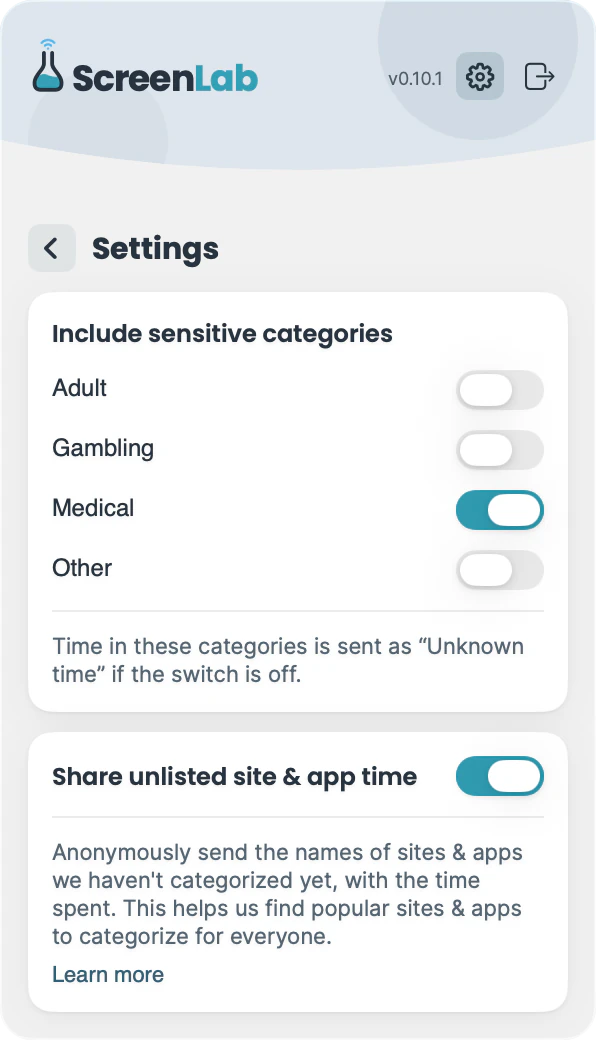
Include sensitive categoriesSensitive content (adult, gambling, medical, etc.) is not tracked by default. Enable a category's switch to track its sites & apps. Your choices are saved to your account, so they apply on every Mac you sign in to.
When a category is switched off, time is sent as "Unlisted", marked only as productive or unproductive. We don't receive the site or the app.
Share unlisted site & app timeOptionally, the app sends apps/sites that aren't on our tracked list, with total time spent. Each one is sent separately, at a random time, with no user account data, device, or date attached. We use these totals to find popular sites and apps to add. Users can turn the switch off to stop sending unlisted sites & apps.
Who has access to that data?
Data is stored on Amazon AWS and render.com servers. We do not sell any data to third parties. Only a small subset of engineers and data scientists employed by ScreenLab have access to AWS/Render keys. (As of November 2026, the list of approved people is 1 person).
Data regarding personal identity can only be accessed by engineers and data scientists employed by ScreenLab. In most instances, personal details are not accessed when examining activity logs. Our logs & error reports may include your IP address, your browser and the pages you visit on our site. We use them only to keep the site secure and fix errors. They're stored by Render, Better Stack and Sentry, and deleted within 90 days.
You can delete your account from your profile settings at any time. Your account, personal details, and activity history are deleted within 7 days, and the last copies in our backups within 6 weeks.
Our vendors
- Cloudflare
- Serves as our CDN (Content Delivery Network).
- Render
- Manages the application, database, and keystore.
- Better Stack
- Stores our server logs.
- Amazon AWS
- Stores archived data.
- Sentry
- Our bug reporting service.
- Google Analytics and PostHog
- Provide user analytics.
- Resend
- Sends our email.
- Scout APM
- Measures site performance.
Analytics & cookies
We use Google Analytics and PostHog to analyze website traffic and behavior. Both set cookies, as do we: one to keep you signed in, one to remember if you're a Mac user. Both Google Analytics and PostHog also get a one-way hash account identifier. Neither vendor is ever sent your name or email address.
PostHog sometimes records session replays, which reconstruct a page as you used it. Your browser blanks every word and image before the recording is sent, so no text or imagery from the page reaches us. The one exception is ScreenLab Lite, which never has personalized data on screen, and therefore records as displayed. Replays are deleted after 30 days. None of this builds an advertising profile, none of it is sold.